top of page

How to have a "Tone" Rings in Every Message

Jul 8
1 min read

Sometimes we get so occupied and unaware of any incoming message from VoicePing. Here is how to have a "tone' rings in every message.


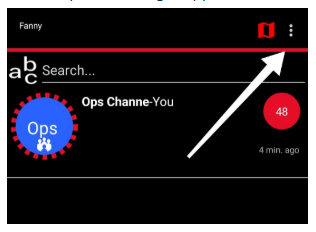
  1. Open VoicePing app

  2. Tap 3 dots in right upper corner 


  3. Choose "Settings"

  4.  Scroll down and tick "Every Message" on 'Tones" section


Recent Posts

See All
NBT Seecode Bluetooth Pairing Problem

In case you have a problem pairing the NBT Seecode device, please follow the following steps to resolve the issue: 1. Exit VoicePing App. 2. Open the Android settings app and go to the Bluetooth conne


Comments


bottom of page